The party system will allow players to adventure together and communicate more effectively.
Forming a Party
Every party must have a party leader. The party leader is the character who adds others to their own party. The party leader is assigned by the system as soon as they add the first member to the party.
This can be done by typing “/add”.

Communication
To communicate inside a party, type with “/” first.
For example: /your cool message
Custom Party Interface
The party system contains a menu that will allow you to more easily manage and maintain your party. This new menu can be opened by typing .party.
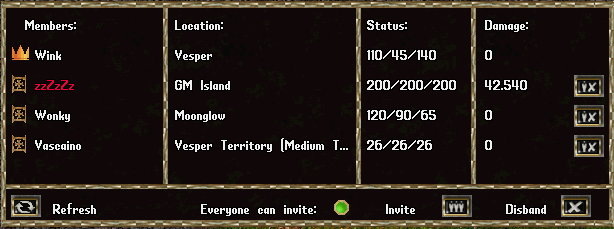
We’ve added a new custom, dynamic gump designed to make group hunts easier to manage.
The interface automatically scales based on the number of players in your party and provides real-time information at a glance.
Features
Tracking: Keep track of the current Health, Stamina, Mana, and location of everyone in the group.
Damage Meter: A counter that tracks the total damage dealt by each member during combat.
Quick Controls: Easily refresh the gump to update stats, or toggle the “Everyone can invite” option so any member can add new players to the group.
Party Leader Controls
As a party leader, the new interface gives you full control over the group’s management directly from the menu:
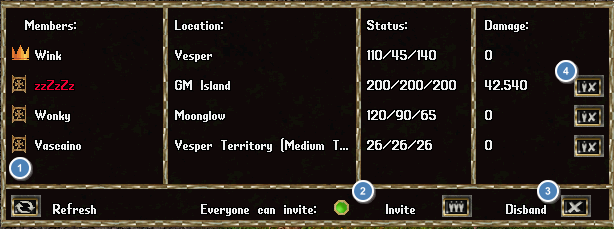
- Leadership Transfer: If you need to step down or log off, you can instantly pass the party leader status to another online member without having to remake the group.
- Open Invites: The party leader can toggle the “Everyone can invite” setting.
When enabled, this allows any current party member to send out group invitations, rather than restricting the ability to the leader. - Disband: disbands the entire party.
- Remove the specific player from the group.
Other Controls (Members & Leader)
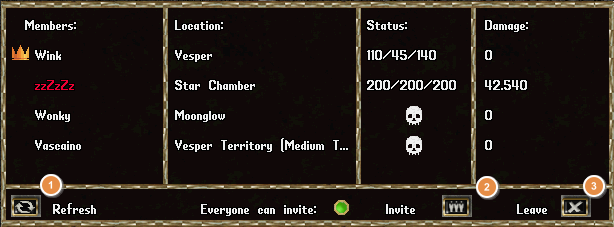
- Refresh: Updates the gump to check for new members, updated status, or the latest damage numbers.
- Invites players to the group.
- Leaves the group.
Visual Indicators
Party Leader: Easily identified by a crown icon next to their name.
Life Status: Dead members are marked with a skull icon.
Murderers (PKs) are highlighted with red names.
Additional Party Mechanics
Party Size: Groups are limited to a maximum of 10 members.
Friendly Fire: Killing a party member (accidental or otherwise) will not add a kill to your murder count.
Damage Tracking: The damage meter exclusively records physical attacks done to monsters (Melee and Archery).
Shared Progression
Progress for specific achievements, such as boss kills and Shame monsters (Medusa, Isliah, Jerushal), is shared among all close-by party members.
Leave a Reply